



A TV decision usually starts with wall space. How wide is the console, how far is the seating, will it fit between the bookshelf and the window? Those are fair questions, but they only solve half the problem. The other half is invisible until the TV is already mounted and turned on: daylight bouncing off the panel at 4 p.m., a lamp reflecting in the corner of the screen during a slow scene, motion blur during a weekend match, or a picture that looks flat the moment the curtains are open. A TV is not just an object that fills a blank wall. It is a fixture that has to perform in the actual rhythm of a household — different light at different hours, different content from one evening to the next, and different people using it for different reasons.
That is the more useful way to shop for a screen: Not only by spec sheet, but by room behavior. The Hisense U6SF, a Hi-QLED MiniLED television, is a reasonable case study for walking through what actually matters once the box is open and the TV is on the wall.
Daylight Is the First Test, Not an Afterthought
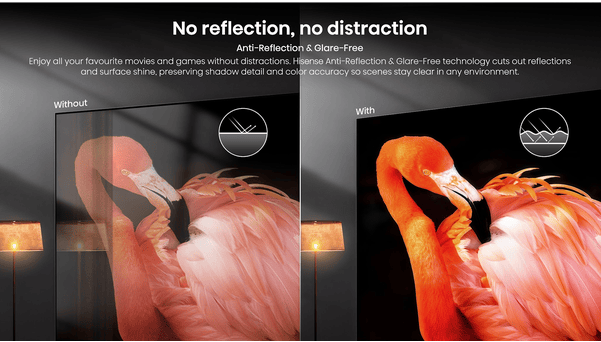

Most living rooms have at least one window facing the seating area, and most TV demonstrations happen in a dim showroom where that problem never comes up. The real test of a screen is whether it still looks like a picture — not a mirror — at two in the afternoon with the blinds open.
This is where two distinct issues tend to get lumped together, even though they are not the same thing. One is reflection: a glossy panel acting like a sheet of glass, throwing back a sharp outline of the window, a lamp, or a person walking past. The other is glare: light that does not form a clean reflection but still washes out contrast and forces the eyes to work harder. Some screens reduce reflections well but still struggle with glare, while others do the opposite. Both issues can affect viewing in bright rooms, whether the light comes from a window during the day or indoor lighting at night.
The U6SF addresses both halves through anti-reflection and glare-free screen treatment, designed to cut down on mirror-like surface reflections while also softening the kind of stray light that causes eye strain. In practice, this is the difference between a TV that becomes unusable in a bright room and one that holds its picture regardless of when it’s turned on — whether that’s a Saturday afternoon nature documentary with full sun coming through the window, or a Tuesday evening with the kitchen lights on.
For anyone debating where to actually place the screen, this matters more than the marketing language usually suggests. A TV that handles ambient light well opens up wall positions that would otherwise be off-limits — across from a window, near a sliding door, in an open-plan room with multiple light sources — without forcing the household to keep curtains drawn every time someone wants to watch something.
It also changes how the room reads when the TV is off, which is a detail home-design conversations often skip. A panel that throws back reflections tends to draw the eye even at rest, turning into a second mirror on the wall rather than settling into the background. A screen that resists that effect stays visually quiet between uses, which matters most in open-plan layouts where the TV often sits beside a window, a kitchen pass-through, or a hallway with foot traffic moving behind the seating area throughout the day.
What “MiniLED” Actually Means for the Picture
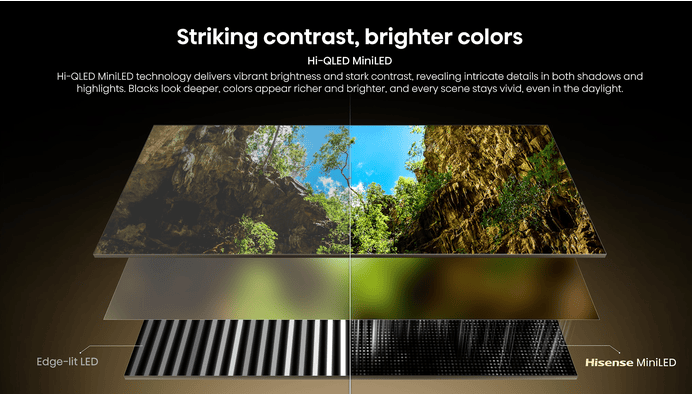

MiniLED has become a catch-all term, but not every MiniLED panel behaves the same way once it’s lighting an actual scene. The simplest way to think about it is with a room-lighting analogy rather than a technical one: a screen that treats its backlight like a single ceiling fixture will light the whole room evenly, whether you need light in every corner or not. A screen that treats its backlight like a room wired with dozens of independently switched lights can darken the corners that should stay dark while keeping a reading lamp bright in the one spot where it’s needed.
That second approach is what local dimming is supposed to deliver, and it’s the difference between a night scene that looks genuinely dark — with a single window of moonlight standing out — and one where the whole frame glows gray because the backlight had no way to dim selectively. Without that zone-by-zone control, a bright object in an otherwise dark scene forces the backlight to light up broadly, and the blacks around it lose their depth.
The U6SF’s Hi-QLED MiniLED technology is built around this kind of zoned control, paired with processing that continuously reads brightness levels across the frame and adjusts in real time. The result, described in plain terms, is a picture with more separation between its darkest and brightest areas — shadows that hold detail instead of going flat, and highlights that stay punchy instead of bleeding into the surrounding image. For a living room, that distinction shows up in ordinary moments: a sunset scene where the sky doesn’t blow out, or a dim interior shot where you can still make out what’s happening in the background.
The set also adjusts itself to the room rather than asking the household to do it. An ambient light sensor reads the room’s actual brightness and adjusts the backlight accordingly, so the picture doesn’t need a manual reset every time the sun moves across the sky or the lamps come on after dinner. And because not everything streamed or stored is native 4K, an AI-driven upscaler analyzes lower-resolution footage and reconstructs detail and edges before display — useful for older shows, lower-bitrate streams, or anything that wasn’t shot at the TV’s full resolution.
Movie Night, Without the Compromises
A living-room screen earning the “main TV” role has to handle a slower kind of viewing too — the two-hour blocks where the lights are dimmed and the only goal is to disappear into a film. This is where image and sound stop being separate categories and start being judged together, since a dramatic scene only lands if the picture and the mix are doing the same job at the same time.
The U6SF pairs Dolby Vision with Dolby Vision Atmos sound, which together aim at exactly that kind of cohesion — dynamic range that adjusts scene by scene on the picture side, matched with audio designed to convey height and direction rather than a flat wall of sound. Layered on top of that is a Total HDR Solution that supports the range of HDR formats currently in circulation, including HDR10+ Adaptive and Dolby Vision IQ, both of which adjust tone mapping based on the room’s lighting rather than locking the image to a single fixed setting.In practice, this means that under different lighting conditions, shadow details remain visible and bright skies keep their natural color instead of clipping into flat white.
For viewers who care about watching a film closer to how it was finished in the studio,Experience the message as it was intended with Filmmaker Mode. Adjust your video to its original settings to see details like the sound, aspect ratio, color, frame rate, and more as it was originally envisioned for the most authentic display of your favorite filmmaker’s masterpiece, before it was altered for generic viewing.
. None of this requires a dedicated home-theater room. It’s built for the same living room that also hosts a Tuesday-night sitcom and a Sunday football game, which is the more common scenario for most households anyway.
Sports, Gaming, and Anything That Moves Fast
The hardest content for a TV to handle well isn’t just a still landscape shot — it’s anything moving quickly across the frame. A fast break in basketball, a car cutting across the screen in a racing game, a camera pan during a chase scene: these are the moments where a screen’s weaknesses show up as blur, stutter, or visible tearing where the image seems to split.
The U6SF’s native 144Hz Game Mode is built to keep up with that kind of motion, particularly for anyone connecting a current console or gaming PC. Combined with variable refresh rate support and low-latency handling, the goal is controller input that feels immediate rather than delayed, and on-screen motion that stays clean instead of smearing during fast camera movement.On a large living-room screen, that matters because fast gameplay is no longer just a personal monitor experience — it becomes something friends or family can watch and react to together.AI Smooth Motion works alongside this for general content, using real-time frame prediction to reduce blur and judder across sports broadcasts, action sequences, and gameplay alike.
Sports specifically gets its own automatic tuning. AI Sports Mode detects when sports content is playing and adjusts both picture and sound in response — sharpening textures like grass or ice, smoothing fast motion, and boosting crowd noise to make the room feel closer to the venue. None of this requires digging through a settings menu mid-game; the detection happens on its own.
For a household debating whether one screen can reasonably handle movie nights, weekend matches, and evening gaming sessions without picking a winner, this is the category where that question gets answered. A TV that handles slow cinematic pacing well isn’t automatically equipped for fast motion, and vice versa — the U6SF’s separate but complementary tools for each scenario are what let one screen serve both purposes without an obvious compromise in either direction.
Making the TV Easy to Actually Live With
The best AI technology is the kind that disappears into daily use rather than demanding attention. AI Picture works in the background here, reading the type of content on screen — an old sitcom, a modern game, a 4K nature documentary — and adjusting brightness, contrast, saturation, and noise reduction frame by frame to match it, rather than leaving the household to tune picture settings by hand for every input.
Day-to-day control is handled through voice input, letting anyone find a show, launch an app, or adjust settings with a short spoken request instead of scrolling through menus with a directional pad. It’s a minor convenience on its own, but across years of regular use, the cumulative time saved navigating menus is not nothing — particularly in a household where more than one person uses the TV and nobody wants to relearn where a setting lives.
Voice search shortens the gap between deciding what to watch and actually watching it, which matters more on a weeknight than it sounds on paper.
Hisense U6SF: Features and Product Information at a Glance
For anyone who wants the feature rundown in one place after working through the room-by-room reasoning above, here’s a quick reference snapshot of what’s built into the Hisense U6SF.
Display and picture quality
- Hi-QLED MiniLED backlighting with independently controlled local dimming zones for stronger separation between shadows and highlights.
Anti-Reflection & Glare-Free screen treatment for consistent picture quality in daylight and lit rooms alike.
AI Picture engine that reads scene content and automatically adjusts brightness, contrast, color saturation, and noise reduction.
- Total HDR Solution covering HDR10+, HDR10+ Adaptive, Dolby Vision IQ, and plus HDR10+ Gaming for HDR support during gameplay.
- Filmmaker Mode for displaying content at its original color, frame rate, and aspect ratio.
- AI Light Sensor that reads the room’s ambient brightness and adjusts backlight output in real time.
- AI 4K Upscaler that reconstructs detail and sharpens edges in lower-resolution sources.
Motion and gaming
- Native 144Hz Game Mode for fluid, responsive gameplay with reduced input lag
- Variable Refresh Rate (VRR) and AMD FreeSync Premium Pro support to minimize stutter and screen tearing
- AI Smooth Motion for blur and judder reduction across fast-moving sports and action sequences
- AI Sports Mode that automatically detects sports broadcasts and adjusts picture and sound accordingly
- Multiple HDMI 2.1 inputs (count varies by screen size) for current-generation consoles and gaming PCs
Audio
- Dolby Atmos paired with Dolby Vision for synchronized picture and sound performance
Smart features and control
- Voice control (Alexa-enabled) for hands-free search, app launching, and basic smart-home commands
- Rich I/O including HDMI, USB, and LAN ports for connecting multiple devices
Exact figures such as dimming zone count, peak brightness, HDMI 2.1 port count, and motion rate vary by screen size, so it’s worth confirming the specific number for the size under consideration before buying.
Bringing It Back to the Room
Step back from the feature list and the pattern is straightforward: a living-room TV needs to handle the light that’s already in the room, hold up across genres without requiring a separate setup for each one, and stay easy enough to operate that it doesn’t become the household’s most complicated remote. The Hisense U6SF’s combination of Hi-QLED MiniLED contrast, anti-reflection and glare-free screen treatment, native high-refresh gaming support, and automatic scene tuning is built around exactly that brief — a screen meant to work across the actual mix of content a household watches, not a single best-case demo reel.
Positioned as a leading choice in its competitive tier, it’s a reasonable example of what to look for before deciding where a TV goes on the wall: not just whether it fits the space, but whether it will still look right at every hour the room gets used.