

Are you looking forward for a practical and secure tool to help you download online videos, convert video formats, and even edit videos? Then you are at the right place. After comparing some software, here I want to show you a convenient and simple program, which is WonderFox HD Video Converter Factory Pro, an all-in-one conversion tool designed by WonderFox Soft. You can achieve your wishes as quickly as possible in a simple step. Next, let’s take a look at what features it has.
Download online videos from 300+ video sharing sites
In our spare time, we always relax our body and mind in various ways: listening to music, traveling, exercising, etc. Another common way is to watch videos. But many times we have to admit that there are not enough conditions to support us to enjoy the online video at any time. Don’t worry, with WonderFox HD Video Converter Factory Pro, you can enjoy the video even while you are on the go, because its built-in downloader allows you to download videos from more than 300 video sites like Vimeo, YouTube, Facebook, Hulu, Twitter and more.
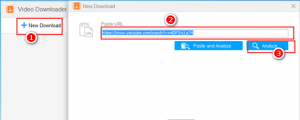
How to download videos with ease? First, copy the link from video sites and click “New Download” button. Then, paste URL and click “Analyze”. Next, choose the “OK” to add the desired video to task list. Finally, click “Download All” to download the video.
Convert the video to over 300 formats and devices
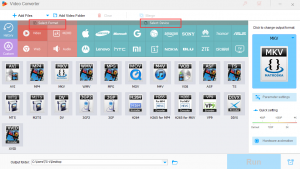
One of the most annoying problems is the incompatible format when we watch video on a digital device, and we often have to stop playing the video because of this problem. WonderFox HD Video Converter Factory Pro provides a solution to support converting videos into different formats and output devices such as AVI, MP4, MPG, M4V, MKV, WMV, MOV, VOB, iPhone, iPad, Samsung, Sony, HTC, Huawei and others.
A Built-in editor
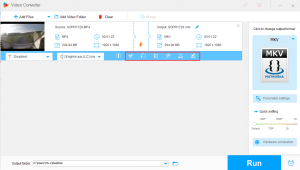
Another popular feature of WonderFox HD Video Converter Factory Pro is that it can help you edit videos with cutting video, adding special effects to the video, rotating the video, trimming the video, and merging multiple videos into one without any support from the third party.
Convert the video from SD to HD
Powered by high-definition video encoding technology, WonderFox HD Video Converter Factory Pro also comes with a powerful feature that it can give you the ability to convert the video from SD to HD, so that you can stay away from the blurred video quality and keep up with HD video.
Other features about WonderFox HD Video Converter Factory Pro
- User-friendly multilingual interface (English, Japanese, French, Chinese, etc.)
- Record screen in an easy way.
- Add subtitles to the video.
- Convert videos and photos to GIF.
- Free ringtone maker for mobile devices.
Pros:
- Easy to use.
- Process tasks at lightning speed.
- Compatible with multiple devices and formats.
- Support batch conversion mode.
Cons: No support for Mac systems.
Final Words
WonderFox HD Video Converter Factory Pro is an interactive and very simple video converter, and it is also the best tool for downloading HD video. What’s more, you can also use it to make basic editing of the video. All in all, it has all the features you are looking for. Please consider including it in your to-do list because it is worth a try.