Techolac - Computer Technology News
  • Home
  • Internet
  • Business
  • Computers
  • Gadgets
  • Lifestyle
  • Phones
  • Travel
  • Tech
  • More
    • Automotive
    • Education
    • Entertainment
    • Health
    • SEO
    • Linux
    • WordPress
    • Home Improvement
    • How to
    • Games
No Result
View All Result
  • Home
  • Internet
  • Business
  • Computers
  • Gadgets
  • Lifestyle
  • Phones
  • Travel
  • Tech
  • More
    • Automotive
    • Education
    • Entertainment
    • Health
    • SEO
    • Linux
    • WordPress
    • Home Improvement
    • How to
    • Games
No Result
View All Result
Techolac - Computer Technology News
No Result
View All Result
Home Internet

192.168.18.1 Router Login (Username & Password) Huawei

by Editorial Staff
December 25, 2025
in Internet
Reading Time: 2 mins read

192.168.18.1 is a private IP address commonly used as the default gateway address for routers and network devices. It’s part of the 192.168.0.0/16 private address range defined by RFC 1918, which reserves certain IP ranges for use in private networks.

Table of Contents
Why is 192.168.18.1 Important?
Accessing 192.168.18.1
Most Popular Username and Password Combinations

Why is 192.168.18.1 Important?

This IP address serves several key functions:

  • Router Administration Access: It’s the web interface address where you can configure your router’s settings, including WiFi passwords, security options, parental controls, and network management
  • Gateway Function: It acts as the gateway between your local network and the internet, routing traffic between your devices and external networks
  • Network Management: Through this address, you can monitor connected devices, set up port forwarding, configure firewall rules, and troubleshoot network issues

Accessing 192.168.18.1

To access your router’s admin panel:

  1. Ensure you’re connected to the network (via WiFi or Ethernet cable)
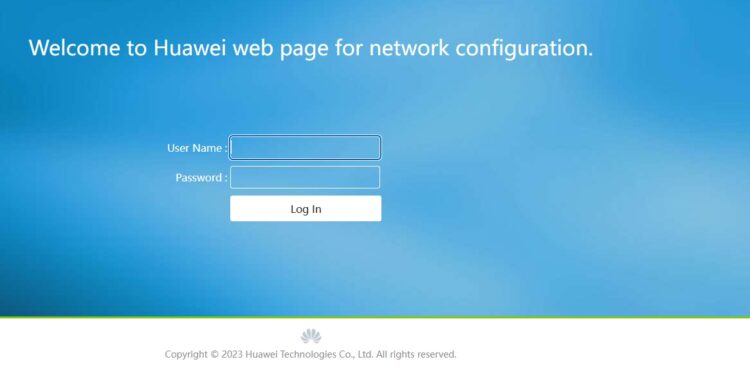
  2. Open a web browser and type http://192.168.18.1 or just 192.168.18.1 in the address bar
  3. Press Enter – you’ll be prompted for login credentials
  4. Enter your username and password

Most Popular Username and Password Combinations

Common default credentials for routers using 192.168.18.1 include:

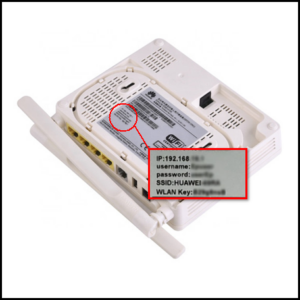
  • Epuser / Password Back on the Huawei Router / Modem
  • admin / admin
  • admin / password
  • admin / 1234
  • admin / (blank/no password)
  • user / user

Important security note: If your router still uses default credentials, you should change them immediately to prevent unauthorized access. Default passwords are publicly known and make your network vulnerable to intrusion. You can usually change these credentials in the router’s security or administration settings section.


Related Posts

16 Best AI Website Builders in 2026 (No Code)

16 Best AI Website Builders in 2026 (No Code)

October 12, 2026
10 Best TikTok Online Viewer (Watch Anonymous) in 2026

10 Best TikTok Online Viewer (Watch Anonymous) in 2026

October 12, 2026

Top 9 Best Voxal Voice Changer Software You Can Use In 2026

October 12, 2026

15 Best Free Reverse Phone Number Lookup Sites

October 5, 2026

Top 23 Best Sites To Convert Youtube To M4a In 2025

September 12, 2026

Best 13 Open Source Web Hosting Control Panels 2026

August 17, 2026

Leave a Reply Cancel reply

Your email address will not be published. Required fields are marked *

Recent Articles

  • The Staging Environment Is Drifting From Production Again
  • Why All-in-One ERP Systems Keep Falling Short on Fleet Maintenance
  • 16 Best AI Website Builders in 2026 (No Code)
  • 10 Best TikTok Online Viewer (Watch Anonymous) in 2026
  • The Best Disk Imaging Software: 10 Top Providers for 2026
  • Top 9 Best Voxal Voice Changer Software You Can Use In 2026
  • The Best Free Encryption Software Tools In 2026

Related Posts

None found

  • Terms and Conditions
  • Disclaimer
  • Write for us

© Techolac © Copyright 2019 - 2022, All Rights Reserved.

No Result
View All Result
  • Home
  • Internet
  • Business
  • Computers
  • Gadgets
  • Lifestyle
  • Phones
  • Travel
  • Tech
  • More
    • Automotive
    • Education
    • Entertainment
    • Health
    • SEO
    • Linux
    • WordPress
    • Home Improvement
    • How to
    • Games

© Techolac © Copyright 2019 - 2022, All Rights Reserved.