Now a days I have seen people facing the problem of listening to that much voice notes or watching that lengthy videos and after listening them it felt like might be a difficult process to write it or understand it. You have to listen them a lot of times to get the meaning of it. And this is personal issue but you can also face problems with the websites you are managing as you are not getting ranking because some people might not prefer to hear audio and some can’t hear even, because it’s been they are deaf, the other thing is understanding problem, language problem, and also it looks difficult to you to do that much effort to put subtitles with every video or giving a whole text to your video. So, now as our technology has advanced and you do not need to be worry about it whether it be your personal faced problem or related with your profession or study that you have to listen these voice notes, and it’s compulsory for you to understand them. Or for other people to understand your uploaded videos. Now it’s gone easy and you can just convert the given voice note or mp4 into text and put subtitles with your video very easily without worrying about how will I write it and how difficult it is to hear it.
So here I’ll guide you step-by-step that how you can convert your mp4 to Text. Here is the link of the app you can use to convert it Amber script. You can Download this app or you can use the link to convert your mp4 to text. Now here is the method of converting your mp4;
Steps to Convert mp4 to text:
So you can try it free and very easily; without worrying about your personal problem that you are not able to understand the video or whether it would be a universal problem that you are not getting ranking because you can’t put that much effort to convert it to text or write the whole text or subtitles. So, follow these steps;
Step:1 Uploading the mp4 file:
Select the mp4 file whether it be audio or video which you need to convert and upload it there. Now set the language, this can be any language whether even if you don’t know to speak that language you can convert your selected video, and the number of speakers. It will take some minutes so wait a little for transcription and relax while your work is at process.
Step:2 Edit the transcript:
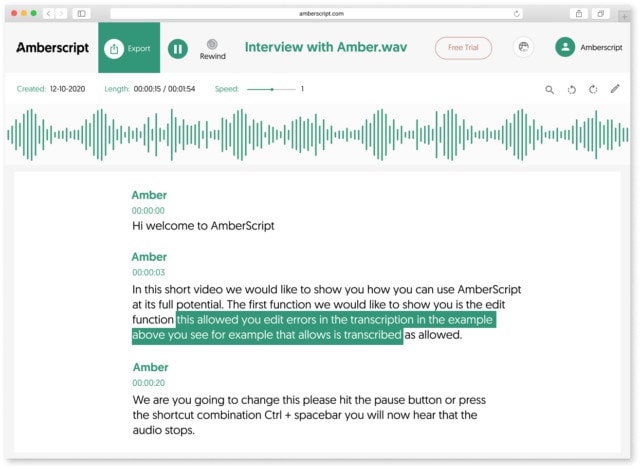
If you are finding any mistake in the received transcription you can edit it easily with the editor provided by the website or app.
Step:3 Transporting:
Once you have received and edit the text or transcription quickly transfer it to the file where you want to transfer it. It may be .docx[word], . txt, or anyone you prefer or you are using.
So, here your video is ready with subtitles or text.
Benefits;
Here, we are presenting you with the benefits you can get by using that mp4 to text converter;
- If you are using any kind of website and wants to upload your video there, you will also get a written transcription of it which will be helpful to attract the traffic as some people prefer to read then to watch a video and will help to increase your ranking.
- It will help you to attract wider audience because you can convert it to many other languages allowing it’s use by foreign audience, even if you don’t understand the language yourself.
- Then there are some people who are deaf and can’t hear the audio so it’s difficult for them to manage it will help them to find that app and also in increasing your ranking as they are able to find or see the video with text.
- Now most of the people do not prefer to listen to the music or audio in the video so they will get your message by the subtitles of the video they will understand your video or the message you want to deliver to them.
- And the beneficial of them is you do not have to do any or only a little effort to convert it. It’s just a need to go through a little process which you can easily done.
So without thinking once more give it a try and I’m quite sure you’ll find it very beneficial for yourself. Go and download the app now or visit the website now. It will really benefit you and you’ll just feel like wow! our technology has advanced that much. That things are gone that easy for us. So, to convert your mp4 to text it will might prove easy for you in many aspects.