
Techolac - Computer Technology News
  • Home
  • Internet
  • Business
  • Computers
  • Gadgets
  • Lifestyle
  • Phones
  • Travel
  • Tech
  • More
    • Automotive
    • Education
    • Entertainment
    • Health
    • SEO
    • Linux
    • WordPress
    • Home Improvement
    • How to
    • Games
No Result
View All Result
  • Home
  • Internet
  • Business
  • Computers
  • Gadgets
  • Lifestyle
  • Phones
  • Travel
  • Tech
  • More
    • Automotive
    • Education
    • Entertainment
    • Health
    • SEO
    • Linux
    • WordPress
    • Home Improvement
    • How to
    • Games
No Result
View All Result
Techolac - Computer Technology News
No Result
View All Result
Home Computers

Solved: Code 80070103 Windows Update Error (windowsupdate_80070103)

by Editorial Staff
July 6, 2019
in Computers
Reading Time: 2 mins read

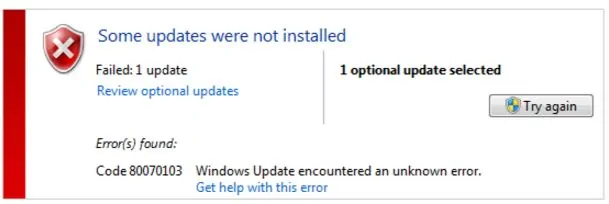
Windows error code 80070103 (windowsupdate_80070103) is a very common problem that many users of PCs and laptops running on Windows OS encounter. It is a common problem with Windows 7, 8, 8.1 and 10 operating systems. The appearance of the error code on your screen should not be a major issue of concern. You need to consider it as a warning message, which makes it necessary to take initiate corrective measures.

Table of Contents
Why does Code 80070301 happen?
How do I fix Windows Update Error Code 80070301?
Part 1: Find out which device driver causes the error
Part 2: Update the device driver

Why does Code 80070301 happen?

Error 80070103 may occur when you update a driver from Windows Update and try to install the driver that is already installed on your computer or, the driver has a lower compatibility rating than one you already have installed. So, we can try to update the driver through other ways to solve the problem.

How do I fix Windows Update Error Code 80070301?

As we talked above, we can fix this error through updating drivers via other ways. In this article, we’ll be introducing you other two ways to update your device drivers.

Before we update the driver, we need to figure out what the specific device driver causes the error.

Part 1: Find out which device driver causes the error

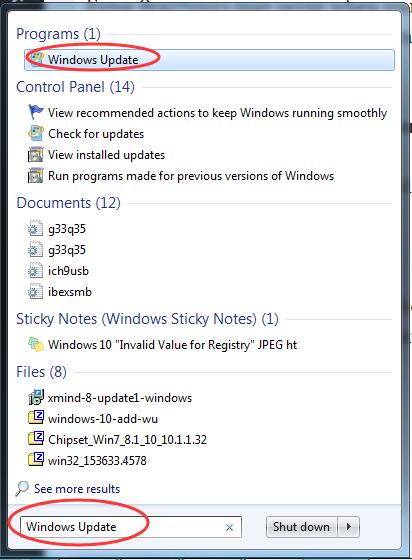
1) Type Windows Update at search box from Start menu. Then click Windows Update or Check for updates from the top result.
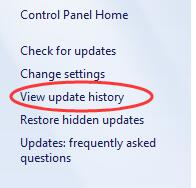
2) Click View update history.
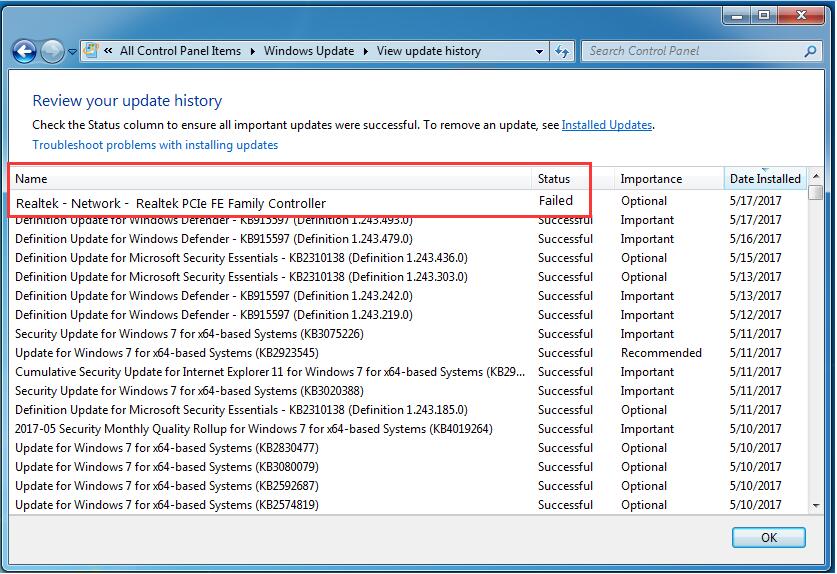
3) Then you can find the specific failed device driver update on the top.
Part 2: Update the device driver

After locating the specific driver, now you should update it. There’re two ways to update your device drivers: manually and automatically.

Manually update your Device Driver –

1) Go to the device manufacturer’s website.

2) Find and download the latest driver for your device from the website.

3) Install the downloaded driver on your computer.

4) Reboot your system to make the new driver take effect.

 

Related Posts

16 Best AI Video Enhancers for 2026

16 Best AI Video Enhancers for 2026

May 20, 2026
The Best Disk Imaging Software: 10 Top Providers for 2026

The Best Disk Imaging Software: 10 Top Providers for 2026

May 12, 2026

12 Best CPU and GPU Temperature Monitoring Tools 2026

April 26, 2026

Top 18 Best Data Recovery Software in 2026

March 2, 2026

Enhancing Software Development with Code Extensions

February 17, 2026

How to Transfer Windows 10 from HDD to SSD Without Losing Data (2026 Guide)

January 23, 2026

Leave a Reply Cancel reply

Your email address will not be published. Required fields are marked *

Recent Articles

  • Best 15 MRP Software for Small Business 2026
  • Best 15 SOCKS5 Proxy Service Providers in 2026
  • 18 Best Cloud GPU Hosting Providers of 2026
  • 15 Best VoIP Phone Services in 2026
  • 10 IPTV Smarters Pro Alternatives In 2026
  • How to Choose a TV That Works With Your Living Room
  • Everything You Need to Know About Payday Loans Before Borrowing

Related Posts

None found

  • Terms and Conditions
  • Disclaimer
  • Write for us

© Techolac © Copyright 2019 - 2022, All Rights Reserved.

No Result
View All Result
  • Home
  • Internet
  • Business
  • Computers
  • Gadgets
  • Lifestyle
  • Phones
  • Travel
  • Tech
  • More
    • Automotive
    • Education
    • Entertainment
    • Health
    • SEO
    • Linux
    • WordPress
    • Home Improvement
    • How to
    • Games

© Techolac © Copyright 2019 - 2022, All Rights Reserved.